SQL Server使用PIVOT与unPIVOT实现行列转换
浏览:12日期:2023-02-22 14:52:25
一、sql行转列:PIVOT
1、基本语法:
create table #table1
    (    id int ,code varchar(10) , name varchar(20) );
go

insert into #table1 ( id,code, name ) values ( 1, "m1","a" ), ( 2,  "m2",null ), ( 3, "m3", "c" ), ( 4,  "m2","d" ), ( 5,  "m1","c" );
go

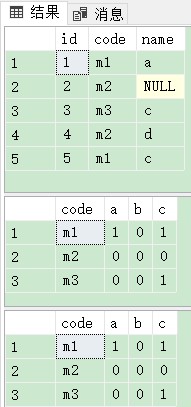
select * from #table1;

--方法一(推荐)
select PVT.code, PVT.a, PVT.b, PVT.c
      from #table1 pivot(count(id) for name in(a, b, c)) as PVT;

--方法二
with P as (select * from #table1)
select PVT.code, PVT.a, PVT.b, PVT.c
     from P        pivot(count(id) for name in(a, b, c)) as PVT;
drop table #table1;
结果:
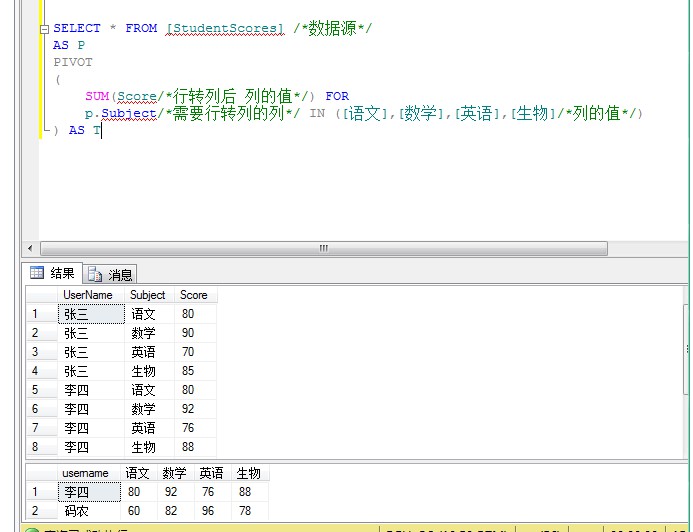
2、实例:
3、传统方式:(先汇总拼接出所需列的字符串,再动态执行转列)
先查询出要转为列的行数据,再拼接字符串。
create table #table1
    (    id int ,code varchar(10) , name varchar(20) );
go

insert into #table1 ( id,code, name ) values ( 1, "m1","a" ), ( 2,  "m2",null ), ( 3, "m3", "c" ), ( 4,  "m2","d" ), ( 5,  "m1","c" );
go

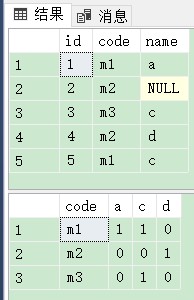
select * from #table1;


declare @strCN nvarchar(100);
select @strCN = isnull(@strCN + ",", "") + quotename(name) from #table1 group by name ;
print  @strCN  --‘[a],[c],[d]"
declare @SqlStr nvarchar(1000);

set @SqlStr = N"
select * from #table1 pivot ( count(ID) for name in (" + @strCN + N") ) as PVT";
exec ( @SqlStr );

drop table #table1;
结果:
二、sql列转行:unPIVOT:
基本语法:
create table #table1 (id int,
code varchar(10),
name1 varchar(20),
name2 varchar(20),
name3 varchar(20));
go
insert into #table1(id, name1, name2, code, name3)
values(1, "m1", "a1", "a2", "a3"),
    (2, "m2", "b1", "b2", "b3"),
    (4, "m1", "c1", "c2", "c3");
go
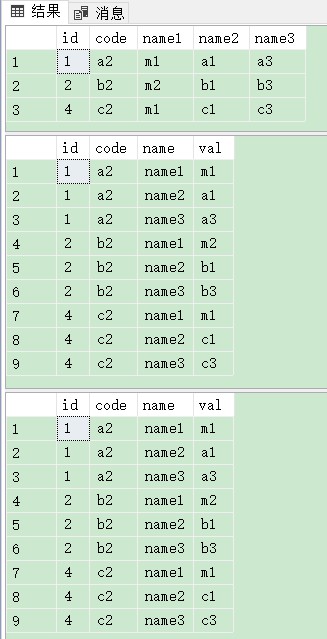
select * from #table1;

--方法一
select PVT.id, PVT.code, PVT.name, PVT.val
            from #table1 unpivot(val for name in(name1, name2, name3)) as PVT;
--方法二
with P as (select * from #table1)
select PVT.id, PVT.code, PVT.name, PVT.val
            from P       unpivot(val for name in(name1, name2, name3)) as PVT;
drop table #table1;
结果:
实例:
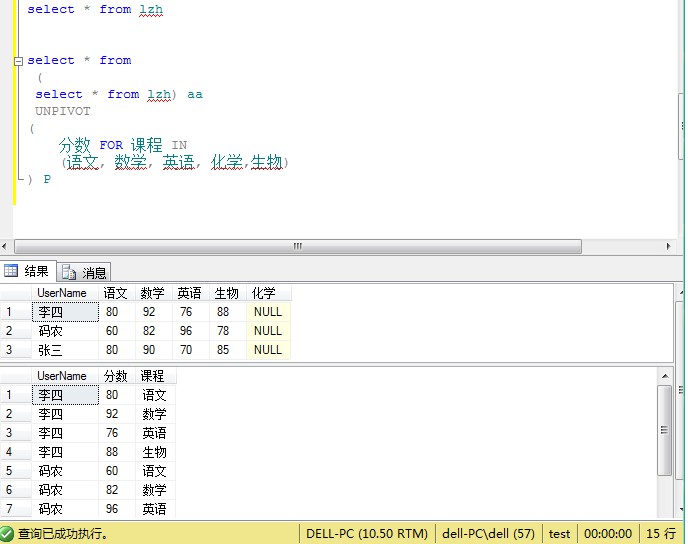
到此这篇关于SQL Server使用PIVOT与unPIVOT实现行列转换的文章就介绍到这了。希望对大家的学习有所帮助,也希望大家多多支持。
标签:
MsSQL
相关文章:
1. 在SQL Server中使用 Try Catch 处理异常的示例详解2. SQL Server系统函数介绍3. SQL Server开发智能提示插件SQL Prompt介绍4. SQL Server序列SEQUENCE用法介绍5. 轻量级数据库SQL Server Express LocalDb介绍6. Can’t connect to MySQL server on ’localhost’ (10048)7. SQL Server使用CROSS APPLY与OUTER APPLY实现连接查询8. SQL Server一个字符串拆分多行显示或者多行数据合并成一个字符串9. SQL Server实现查询每个分组的前N条记录10. 详解SQL Server 中的 ACID 属性
- 排行榜

- 将数据库直接备份到网络上其它计算机硬盘
- 1. centos 7安装mysql5.5和安装 mariadb使用的命令
- 2. SQLServer数据库误操作恢复的方法
- 3. MySQL分支选择参考:Percona还是MariaDB
- 4. DB2 数据库创建、表的ixf文件导出导入示例
- 5. MySQL中ADD COLUMN添加多个字段的写法实例
- 6. SQL SERVER中的流程控制语句
- 7. SQL Server Reporting Services 匿名登录的问题及解决方案
- 8. MongoDB 聚合查询详解
- 9. 常见数据库系统比较 DB2数据库
- 10. SqlServer服务中利用触发器对指定账户进行登录ip限制提升安全性操作
 网公网安备
网公网安备